Showing posts with label Firewall. Show all posts

1/27/2011

Network based IDS - Snort

[1] Install and configure Snort
[root@www ~]# wget http://www.snort.org/dl/binaries/linux/snort-2.8.2.1-1.RH5.i386.rpm

[root@www ~]# rpm -Uvh snort-2.8.2.1-1.RH5.i386.rpm
Preparing...############################ [100%]
1:snort############################ [100%]
[root@www ~]# vi /etc/snort/snort.conf

# line 46: change to LAN
var HOME_NET 192.168.0.0/24

# line 49: change
var EXTERNAL_NET !$HOME_NET

[root@www ~]# vi /etc/logrotate.d/snort

# line 4: change
/var/log/snort/alert /var/log/snort/*log {
[2] Register from here for free in order to get snort rule files. After registration, download "snortrules-snapshot-CURRENT.tar.gz" and upload it on your server.

[3] Install the file that is uploaded on [2] and start Snort.
[root@www ~]# tar zxvf snortrules-snapshot-CURRENT.tar.gz
[root@www ~]# cp -r rules/* /etc/snort/rules/
[root@www ~]# rm -rf doc etc rules so_rules
[root@www ~]# /etc/rc.d/init.d/snortd start
Starting snort: [ OK ]
[root@www ~]# chkconfig snortd on
[4] Install SnortSnarf in order to watch logs of Snort from Web browser.
[root@www ~]# yum --enablerepo=dag install perl-Time-module
[root@www ~]# wget http://www.snort.org/dl/contrib/data_analysis/snortsnarf/SnortSnarf-050314.1.tar.gz
[root@www ~]# tar zxvf SnortSnarf-050314.1.tar.gz
[root@www ~]# mkdir /usr/local/bin/snortsnarf
[root@www ~]# cp SnortSnarf-050314.1/snortsnarf.pl /usr/local/bin/snortsnarf/
[root@www ~]# cp -r SnortSnarf-050314.1/include /usr/local/bin/snortsnarf/
[root@www ~]# vi /usr/local/bin/snortsnarf/include/SnortSnarf/HTMLMemStorage.pm

# line 290: change (remove '->')
return @arr[($first-1)..$end];

[root@www ~]# vi /usr/local/bin/snortsnarf/include/SnortSnarf/HTMLAnomMemStorage.pm

# line 266: change (remove '->')
return @arr[($first-1)..$end];

[root@www ~]# vi /etc/httpd/conf.d/snort.conf

Alias /snort /var/www/snort


Order deny,allow
Deny from all
# IP address you allow
Allow from 127.0.0.1 192.168.0


[root@www ~]# /etc/rc.d/init.d/httpd restart
Stopping httpd: [ OK ]
Starting httpd: [ OK ]
[root@www ~]# vi snortsnarf.sh# create init script

#!/bin/bash

cd /usr/local/snortsnarf
if [ -s /var/log/snort/alert ]; then
if [ -s /var/log/snort/portscan.log ]; then
./snortsnarf.pl -dns -d /var/www/snort /var/log/snort/alert /var/log/snort/portscan.log
else
./snortsnarf.pl -dns -d /var/www/snort /var/log/snort/alert
fi
fi

[root@www ~]# chmod 700 snortsnarf.sh
[root@www ~]# ./snortsnarf.sh# run
[root@www ~]# crontab -e

*/10 * * * * /root/snortsnarf.sh# run every 10 minutes
[5] Access to the page you set with web browser, then SnortSnarf start page is shown and you can watch the logs of Snort.
[6] Try to portscan with nmap from your another Host to your Snort Server and verify Snort logs.


[7] Install Oinkmaster in order to update rule files automatically. A code is necessarry for it, Login and push "Get Code" in the site and remember it.
[root@www ~]# wget http://jaist.dl.sourceforge.net/sourceforge/oinkmaster/oinkmaster-2.0.tar.gz 
[root@www ~]# tar zxvf oinkmaster-2.0.tar.gz
[root@www ~]# cp oinkmaster-2.0/oinkmaster.pl /usr/local/bin/
[root@www ~]# cp oinkmaster-2.0/oinkmaster.conf /etc/
[root@www ~]# rm -rf oinkmaster-2.0
[root@www ~]# vi /etc/oinkmaster.conf

# line 55: change code you got
url = http://www.snort.org/pub-bin/oinkmaster.cgi/(your code)/snortrules-snapshot-CURRENT.tar.gz

[root@www ~]# oinkmaster.pl -o /etc/snort/rules/   # run
Loading /etc/oinkmaster.conf
Downloading file from http://www.snort.org/pub-bin/oinkmaster.cgi/*oinkcode*/snortrules-snapshot-CURRENT.tar.gz... done.
Archive successfully downloaded, unpacking... done.
Setting up rules structures...
WARNING: duplicate SID in your local rules, SID 3017 exists multiple times, you may need to fix this manually!
done.
Processing downloaded rules... disabled 0, enabled 0, modified 0, total=12183
Setting up rules structures...
WARNING: duplicate SID in your local rules, SID 3017 exists multiple times, you may need to fix this manually!
done.
Comparing new files to the old ones... done.

[***] Results from Oinkmaster started 20080621 23:56:39 [***]

[*] Rules modifications: [*]
   None.

[*] Non-rule line modifications: [*]
   None.

[*] Added files: [*]
   None.

[root@www ~]# vi oinkmaster.sh# create init script

#!/bin/sh

/usr/bin/oinkmaster.pl -o /etc/snort/rules/ 2>&1 | logger -t oinkmaster
/etc/rc.d/init.d/snortd restart > /dev/null

[root@www ~]# chmod 700 oinkmaster.sh
[root@www ~]# ./oinkmaster.sh# run
[root@www ~]# crontab -e

0 1 * * * /root/oinkmaster.sh# run every 1:00 AM

10/29/2010

Build proxy server and make web browzing fast. Install squid for it.


[1] Install Squid  
[root@lan ~]# yum -y install squid
[root@lan ~]# vi /etc/squid/squid.conf
# line 919: change
http_port 8080
acl CONNECT method CONNECT

# line 590: add ( allow from only LAN )
acl lan src 192.168.0.0/255.255.255.0
http_access allow localhost

# line 637: add ( allow from only LAN )
http_access allow lan
http_access deny all
# line 3003: add ( define hostname )

visible_hostname lan.server-linux.info
# forwarded_for on

# line 4275: add ( hide IP )
forwarded_for off
# line 2789: add these lines
header_access Referer deny all
header_access X-Forwarded-For deny all
header_access Via deny all
header_access Cache-Control deny all
[root@lan ~]# /etc/rc.d/init.d/squid start
init_cache_dir /var/spool/squid... Starting squid:
[  OK  ]
[root@lan ~]#chkconfig squid on

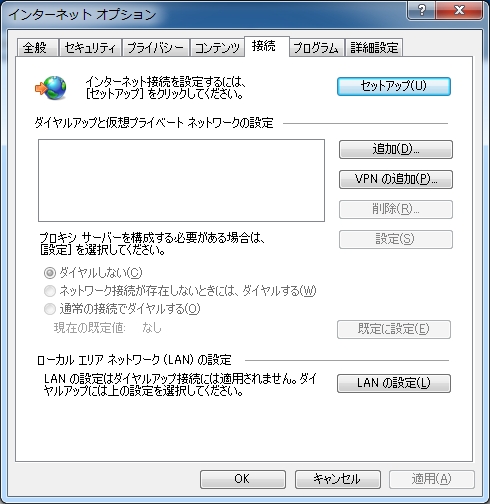
[2].Start Web browser on your client PC. Select [Tools] - [Internet Options] and move to [Connections] tab like below.
Image option IE

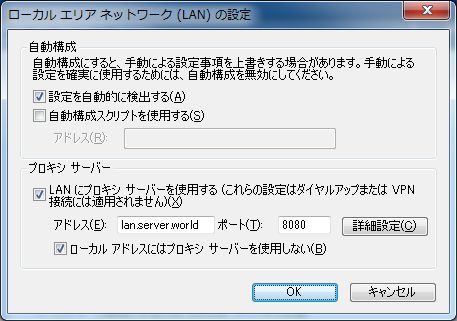
[3].Check 'use a proxy' and input server's hostname and port number set in the section [1]. Then, you can access to internet through proxy server.
Image Add adress proxy

10/13/2010

Setup Squid-Cache

Step I - Downloading and compiling Squid

You can download squid source file as a gzipped tar ball (squid-x.y-STABLE.tar.gz) available at http://www.squid-cache.org/ or from ftp://www.squid-cache.org/pub.

Next you have to extract the compressed archive file and change the working directory to squid

tar -xvzf squid-*-src.tar.gz
cd squid -*

Now enter the following commands in order to configure, compile and install squid

./configure
make
make install

This by default, will install in "/usr/local/squid".

Type ./configure --help to view all available options.

Step II - Basic Configuration

Some basic configurations are to be done. Uncomment and edit the following lines in the configuration file found default at "/usr/local/squid/etc/squid.conf".

cache_dir this direcitve specifies the cache directory storage format and its size as given below.
cache_dir ufs /usr/local/squid/cache 100 16 256
The value 100 denotes 100MB cache size. This can be adjusted to the required size.

http_port
Check http_port, 3128 is a default.

http_access
By default http_access is denied. The ACL rules should be modified to allow access only to the trusted clients. This is important because it prevents people from stealing your network resources.

cache_effective_user & cache_effective_ group
Set these directive to the user and group by which squid will run. This user should have the permission to read and write in the cache directory and to the log files. .

Step III - Custom configuration based on your network needs

For Configuring squid for proxy

By default, squid is configured as a direct proxy . In order to cache web traffic with squid, the browser must be configured to use the squid proxy. This needs the following information

i. the proxy server's host name
ii. the port by which the proxy server accepts connections.

For Configuring squid for transparency

Using squid transparently is a two part process, requiring first that squid be configured properly to accept non-proxy requests (performed in the squid module) and second that web traffic gets redirected to the squid port (achieved in three ways namely policy based routing, Using smart switching or by setting squid Box as a gateway).

Getting transparent caching to work requires the following steps

i. For some operating systems, you have to configure and build a version of Squid which can recognize the hijacked connections and discern the destination addresses. For Linux this seems to work automatically. For BSD-based systems, configure squid with the --enable-ipf-transparent option and you have to configure squid as

httpd_accel_host virtual
httpd_accel_port 80
httpd_accel_with_proxy on
httpd_accel_uses_host_header on

ii. Next you have to configure your cache host to accept the redirected packets - any IP address, on port 80 - and deliver them to your cache application. This is typically done with IP filtering/forwarding features built into the kernel. In Linux they call this ipfilter (kernel 2.4.x), ipchains (2.2.x) or ipfwadm (2.0.x).

For Configuring squid for Reverse Proxy

To run Squid as an accelerator, you probably want to listen on port 80. And you have to define the machine you are accelerating for. This is done in squid module,

http_port 80
httpd_accel_host visolve.com
httpd_accel_port 81
httpd_accel_single_host on
httpd_accel_with_proxy on

If you are using Squid as an accelerator for a virtual host system, then instead of a 'hostname' here you have to use the word virtual as:

http_port 80
httpd_accel_host virtual
httpd_accel_port 81
httpd_accel_with_proxy on
httpd_accel_single_host off

Step IV - Starting Squid

After you've finished editing the configuration file, you can start Squid for the first time. First, you must create the swap directories. Do this by running Squid with the -z option:

/usr/local/squid/sbin/squid -z

Once that completes, you can start Squid and try it out. Probably the best thing to do is run it from your terminal and watch the debugging output. Use this command:

/usr/local/squid/sbin/squid -NCd1

If everything is working fine, then your console displays: "Ready to serve requests".

If you want to run squid in the background, as a daemon process

/usr/local/squid/sbin/squid

You should be a privileged user to start/stop squid..

Step V - To check if Squid is working

Check the cache.log file in your logs directory to find out if squid works correctly. This file contains the informational and error messages that Squid generates at runtime.

9/11/2010

DDoS Protection Script For iptables !

#!/bin/sh
#------------------------------------------------------------------------------
#
# File: SIG-antiDDoS.sh
#
# Compiler: Ruslan Abuzant
# PS> Collected From Lots Of Sources
# PS> Credits: Real Authors (no idea)
#
# URL: http://www.liteforex.org/
#
# License: GNU GPL (version 2, or any later version).
#
# Configuration.
#------------------------------------------------------------------------------

# For debugging use iptables -v.
IPTABLES="/sbin/iptables"
IP6TABLES="/sbin/ip6tables"
MODPROBE="/sbin/modprobe"
RMMOD="/sbin/rmmod"
ARP="/usr/sbin/arp"


# Logging options.
#------------------------------------------------------------------------------
LOG="LOG --log-level debug --log-tcp-sequence --log-tcp-options"
LOG="$LOG --log-ip-options"


# Defaults for rate limiting
#------------------------------------------------------------------------------
RLIMIT="-m limit --limit 3/s --limit-burst 8"


# Unprivileged ports.
#------------------------------------------------------------------------------
PHIGH="1024:65535"
PSSH="1000:1023"


# Load required kernel modules
#------------------------------------------------------------------------------
$MODPROBE ip_conntrack_ftp
$MODPROBE ip_conntrack_irc


# Mitigate ARP spoofing/poisoning and similar attacks.
#------------------------------------------------------------------------------
# Hardcode static ARP cache entries here
# $ARP -s IP-ADDRESS MAC-ADDRESS


# Kernel configuration.
#------------------------------------------------------------------------------

# Disable IP forwarding.
# On => Off = (reset)
echo 1 > /proc/sys/net/ipv4/ip_forward
echo 0 > /proc/sys/net/ipv4/ip_forward

# Enable IP spoofing protection
for i in /proc/sys/net/ipv4/conf/*/rp_filter; do echo 1 > $i; done

# Protect against SYN flood attacks
echo 1 > /proc/sys/net/ipv4/tcp_syncookies

# Ignore all incoming ICMP echo requests
echo 0 > /proc/sys/net/ipv4/icmp_echo_ignore_all

# Ignore ICMP echo requests to broadcast
echo 1 > /proc/sys/net/ipv4/icmp_echo_ignore_broadcasts

# Log packets with impossible addresses.
for i in /proc/sys/net/ipv4/conf/*/log_martians; do echo 1 > $i; done

# Don't log invalid responses to broadcast
echo 1 > /proc/sys/net/ipv4/icmp_ignore_bogus_error_responses

# Don't accept or send ICMP redirects.
for i in /proc/sys/net/ipv4/conf/*/accept_redirects; do echo 0 > $i; done
for i in /proc/sys/net/ipv4/conf/*/send_redirects; do echo 0 > $i; done

# Don't accept source routed packets.
for i in /proc/sys/net/ipv4/conf/*/accept_source_route; do echo 0 > $i; done

# Disable multicast routing
for i in /proc/sys/net/ipv4/conf/*/mc_forwarding; do echo 0 > $i; done

# Disable proxy_arp.
for i in /proc/sys/net/ipv4/conf/*/proxy_arp; do echo 0 > $i; done

# Enable secure redirects, i.e. only accept ICMP redirects for gateways
# Helps against MITM attacks.
for i in /proc/sys/net/ipv4/conf/*/secure_redirects; do echo 1 > $i; done

# Disable bootp_relay
for i in /proc/sys/net/ipv4/conf/*/bootp_relay; do echo 0 > $i; done

# Default policies.
#------------------------------------------------------------------------------

# Drop everything by default.
$IPTABLES -P INPUT DROP
$IPTABLES -P FORWARD DROP
$IPTABLES -P OUTPUT DROP

# Set the nat/mangle/raw tables' chains to ACCEPT
$IPTABLES -t nat -P PREROUTING ACCEPT
$IPTABLES -t nat -P OUTPUT ACCEPT
$IPTABLES -t nat -P POSTROUTING ACCEPT

$IPTABLES -t mangle -P PREROUTING ACCEPT
$IPTABLES -t mangle -P INPUT ACCEPT
$IPTABLES -t mangle -P FORWARD ACCEPT
$IPTABLES -t mangle -P OUTPUT ACCEPT
$IPTABLES -t mangle -P POSTROUTING ACCEPT

# Cleanup.
#------------------------------------------------------------------------------

# Delete all
$IPTABLES -F
$IPTABLES -t nat -F
$IPTABLES -t mangle -F

# Delete all
$IPTABLES -X
$IPTABLES -t nat -X
$IPTABLES -t mangle -X

# Zero all packets and counters.
$IPTABLES -Z
$IPTABLES -t nat -Z
$IPTABLES -t mangle -Z

# Completely disable IPv6.
#------------------------------------------------------------------------------

# Block all IPv6 traffic
# If the ip6tables command is available, try to block all IPv6 traffic.
if test -x $IP6TABLES; then
# Set the default policies
# drop everything
$IP6TABLES -P INPUT DROP 2>/dev/null
$IP6TABLES -P FORWARD DROP 2>/dev/null
$IP6TABLES -P OUTPUT DROP 2>/dev/null

# The mangle table can pass everything
$IP6TABLES -t mangle -P PREROUTING ACCEPT 2>/dev/null
$IP6TABLES -t mangle -P INPUT ACCEPT 2>/dev/null
$IP6TABLES -t mangle -P FORWARD ACCEPT 2>/dev/null
$IP6TABLES -t mangle -P OUTPUT ACCEPT 2>/dev/null
$IP6TABLES -t mangle -P POSTROUTING ACCEPT 2>/dev/null

# Delete all rules.
$IP6TABLES -F 2>/dev/null
$IP6TABLES -t mangle -F 2>/dev/null

# Delete all chains.
$IP6TABLES -X 2>/dev/null
$IP6TABLES -t mangle -X 2>/dev/null

# Zero all packets and counters.
$IP6TABLES -Z 2>/dev/null
$IP6TABLES -t mangle -Z 2>/dev/null
fi

# Custom user-defined chains.
#------------------------------------------------------------------------------

# LOG packets, then ACCEPT.
$IPTABLES -N ACCEPTLOG
$IPTABLES -A ACCEPTLOG -j $LOG $RLIMIT --log-prefix "ACCEPT "
$IPTABLES -A ACCEPTLOG -j ACCEPT

# LOG packets, then DROP.
$IPTABLES -N DROPLOG
$IPTABLES -A DROPLOG -j $LOG $RLIMIT --log-prefix "DROP "
$IPTABLES -A DROPLOG -j DROP

# LOG packets, then REJECT.
# TCP packets are rejected with a TCP reset.
$IPTABLES -N REJECTLOG
$IPTABLES -A REJECTLOG -j $LOG $RLIMIT --log-prefix "REJECT "
$IPTABLES -A REJECTLOG -p tcp -j REJECT --reject-with tcp-reset
$IPTABLES -A REJECTLOG -j REJECT

# Only allows RELATED ICMP types
# (destination-unreachable, time-exceeded, and parameter-problem).
# TODO: Rate-limit this traffic?
# TODO: Allow fragmentation-needed?
# TODO: Test.
$IPTABLES -N RELATED_ICMP
$IPTABLES -A RELATED_ICMP -p icmp --icmp-type destination-unreachable -j ACCEPT
$IPTABLES -A RELATED_ICMP -p icmp --icmp-type time-exceeded -j ACCEPT
$IPTABLES -A RELATED_ICMP -p icmp --icmp-type parameter-problem -j ACCEPT
$IPTABLES -A RELATED_ICMP -j DROPLOG

# Make It Even Harder To Multi-PING
$IPTABLES -A INPUT -p icmp -m limit --limit 1/s --limit-burst 2 -j ACCEPT
$IPTABLES -A INPUT -p icmp -m limit --limit 1/s --limit-burst 2 -j LOG --log-prefix PING-DROP:
$IPTABLES -A INPUT -p icmp -j DROP
$IPTABLES -A OUTPUT -p icmp -j ACCEPT

# Only allow the minimally required/recommended parts of ICMP. Block the rest.
#------------------------------------------------------------------------------

# TODO: This section needs a lot of testing!

# First, drop all fragmented ICMP packets (almost always malicious).
$IPTABLES -A INPUT -p icmp --fragment -j DROPLOG
$IPTABLES -A OUTPUT -p icmp --fragment -j DROPLOG
$IPTABLES -A FORWARD -p icmp --fragment -j DROPLOG

# Allow all ESTABLISHED ICMP traffic.
$IPTABLES -A INPUT -p icmp -m state --state ESTABLISHED -j ACCEPT $RLIMIT
$IPTABLES -A OUTPUT -p icmp -m state --state ESTABLISHED -j ACCEPT $RLIMIT

# Allow some parts of the RELATED ICMP traffic, block the rest.
$IPTABLES -A INPUT -p icmp -m state --state RELATED -j RELATED_ICMP $RLIMIT
$IPTABLES -A OUTPUT -p icmp -m state --state RELATED -j RELATED_ICMP $RLIMIT

# Allow incoming ICMP echo requests (ping), but only rate-limited.
$IPTABLES -A INPUT -p icmp --icmp-type echo-request -j ACCEPT $RLIMIT

# Allow outgoing ICMP echo requests (ping), but only rate-limited.
$IPTABLES -A OUTPUT -p icmp --icmp-type echo-request -j ACCEPT $RLIMIT

# Drop any other ICMP traffic.
$IPTABLES -A INPUT -p icmp -j DROPLOG
$IPTABLES -A OUTPUT -p icmp -j DROPLOG
$IPTABLES -A FORWARD -p icmp -j DROPLOG

# Selectively allow certain special types of traffic.
#------------------------------------------------------------------------------

# Allow loopback interface to do anything.
$IPTABLES -A INPUT -i lo -j ACCEPT
$IPTABLES -A OUTPUT -o lo -j ACCEPT

# Allow incoming connections related to existing allowed connections.
$IPTABLES -A INPUT -m state --state ESTABLISHED,RELATED -j ACCEPT

# Allow outgoing connections EXCEPT invalid
$IPTABLES -A OUTPUT -m state --state NEW,ESTABLISHED,RELATED -j ACCEPT

# Miscellaneous.
#------------------------------------------------------------------------------

# We don't care about Milkosoft, Drop SMB/CIFS/etc..
$IPTABLES -A INPUT -p tcp -m multiport --dports 135,137,138,139,445,1433,1434 -j DROP
$IPTABLES -A INPUT -p udp -m multiport --dports 135,137,138,139,445,1433,1434 -j DROP

# Explicitly drop invalid incoming traffic
$IPTABLES -A INPUT -m state --state INVALID -j DROP

# Drop invalid outgoing traffic, too.
$IPTABLES -A OUTPUT -m state --state INVALID -j DROP

# If we would use NAT, INVALID packets would pass - BLOCK them anyways
$IPTABLES -A FORWARD -m state --state INVALID -j DROP

# PORT Scanners (stealth also)
$IPTABLES -A INPUT -m state --state NEW -p tcp --tcp-flags ALL ALL -j DROP
$IPTABLES -A INPUT -m state --state NEW -p tcp --tcp-flags ALL NONE -j DROP

# TODO: Some more anti-spoofing rules? For example:
# $IPTABLES -A INPUT -p tcp --tcp-flags ALL FIN,URG,PSH -j DROP
# $IPTABLES -A INPUT -p tcp --tcp-flags SYN,RST SYN,RST -j DROP
# $IPTABLES -A INPUT -p tcp --tcp-flags SYN,FIN SYN,FIN -j DROP
$IPTABLES -N SYN_FLOOD
$IPTABLES -A INPUT -p tcp --syn -j SYN_FLOOD
$IPTABLES -A SYN_FLOOD -m limit --limit 2/s --limit-burst 6 -j RETURN
$IPTABLES -A SYN_FLOOD -j DROP

# TODO: Block known-bad IPs (see http://www.dshield.org/top10.php).
# $IPTABLES -A INPUT -s INSERT-BAD-IP-HERE -j DROPLOG

# Drop any traffic from IANA-reserved IPs.
#------------------------------------------------------------------------------

$IPTABLES -A INPUT -s 0.0.0.0/7 -j DROP
$IPTABLES -A INPUT -s 2.0.0.0/8 -j DROP
$IPTABLES -A INPUT -s 5.0.0.0/8 -j DROP
$IPTABLES -A INPUT -s 7.0.0.0/8 -j DROP
$IPTABLES -A INPUT -s 10.0.0.0/8 -j DROP
$IPTABLES -A INPUT -s 23.0.0.0/8 -j DROP
$IPTABLES -A INPUT -s 27.0.0.0/8 -j DROP
$IPTABLES -A INPUT -s 31.0.0.0/8 -j DROP
$IPTABLES -A INPUT -s 36.0.0.0/7 -j DROP
$IPTABLES -A INPUT -s 39.0.0.0/8 -j DROP
$IPTABLES -A INPUT -s 42.0.0.0/8 -j DROP
$IPTABLES -A INPUT -s 49.0.0.0/8 -j DROP
$IPTABLES -A INPUT -s 50.0.0.0/8 -j DROP
$IPTABLES -A INPUT -s 77.0.0.0/8 -j DROP
$IPTABLES -A INPUT -s 78.0.0.0/7 -j DROP
$IPTABLES -A INPUT -s 92.0.0.0/6 -j DROP
$IPTABLES -A INPUT -s 96.0.0.0/4 -j DROP
$IPTABLES -A INPUT -s 112.0.0.0/5 -j DROP
$IPTABLES -A INPUT -s 120.0.0.0/8 -j DROP
$IPTABLES -A INPUT -s 169.254.0.0/16 -j DROP
$IPTABLES -A INPUT -s 172.16.0.0/12 -j DROP
$IPTABLES -A INPUT -s 173.0.0.0/8 -j DROP
$IPTABLES -A INPUT -s 174.0.0.0/7 -j DROP
$IPTABLES -A INPUT -s 176.0.0.0/5 -j DROP
$IPTABLES -A INPUT -s 184.0.0.0/6 -j DROP
$IPTABLES -A INPUT -s 192.0.2.0/24 -j DROP
$IPTABLES -A INPUT -s 197.0.0.0/8 -j DROP
$IPTABLES -A INPUT -s 198.18.0.0/15 -j DROP
$IPTABLES -A INPUT -s 223.0.0.0/8 -j DROP
$IPTABLES -A INPUT -s 224.0.0.0/3 -j DROP

# Selectively allow certain outbound connections, block the rest.
#------------------------------------------------------------------------------

# Allow outgoing DNS requests. Few things will work without this.
$IPTABLES -A OUTPUT -m state --state NEW -p udp --dport 53 -j ACCEPT
$IPTABLES -A OUTPUT -m state --state NEW -p tcp --dport 53 -j ACCEPT

# Allow outgoing HTTP requests. Unencrypted, use with care.
$IPTABLES -A OUTPUT -m state --state NEW -p tcp --dport 80 -j ACCEPT

# Allow outgoing HTTPS requests.
$IPTABLES -A OUTPUT -m state --state NEW -p tcp --dport 443 -j ACCEPT

# Allow outgoing SMTPS requests. Do NOT allow unencrypted SMTP!
# $IPTABLES -A OUTPUT -m state --state NEW -p tcp --dport 465 -j ACCEPT

# Allow outgoing "submission" (RFC 2476) requests.
$IPTABLES -A OUTPUT -m state --state NEW -p tcp --dport 587 -j ACCEPT

# Allow outgoing POP3S requests.
$IPTABLES -A OUTPUT -m state --state NEW -p tcp --dport 995 -j ACCEPT

# Allow outgoing SSH requests.
$IPTABLES -A OUTPUT -m state --state NEW -p tcp --dport 22 -j ACCEPT

# Allow outgoing FTP requests. Unencrypted, use with care.
$IPTABLES -A OUTPUT -m state --state NEW -p tcp --dport 21 -j ACCEPT

# Allow outgoing NNTP requests. Unencrypted, use with care.
# $IPTABLES -A OUTPUT -m state --state NEW -p tcp --dport 119 -j ACCEPT

# Allow outgoing NTP requests. Unencrypted, use with care.
# $IPTABLES -A OUTPUT -m state --state NEW -p udp --dport 123 -j ACCEPT

# Allow outgoing IRC requests. Unencrypted, use with care.
# Note: This usually needs the ip_conntrack_irc kernel module.
# $IPTABLES -A OUTPUT -m state --state NEW -p tcp --dport 6667 -j ACCEPT

# Allow outgoing requests to various proxies. Unencrypted, use with care.
# $IPTABLES -A OUTPUT -m state --state NEW -p tcp --dport 8080 -j ACCEPT
# $IPTABLES -A OUTPUT -m state --state NEW -p tcp --dport 8090 -j ACCEPT

# Allow outgoing DHCP requests. Unencrypted, use with care.
# TODO: This is completely untested, I have no idea whether it works!
# TODO: I think this can be tightened a bit more.
$IPTABLES -A OUTPUT -m state --state NEW -p udp --sport 67:68 --dport 67:68 -j ACCEPT

# Allow outgoing CVS requests. Unencrypted, use with care.
# $IPTABLES -A OUTPUT -m state --state NEW -p tcp --dport 2401 -j ACCEPT

# Allow outgoing MySQL requests. Unencrypted, use with care.
# $IPTABLES -A OUTPUT -m state --state NEW -p tcp --dport 3306 -j ACCEPT

# Allow outgoing SVN requests. Unencrypted, use with care.
# $IPTABLES -A OUTPUT -m state --state NEW -p tcp --dport 3690 -j ACCEPT

# Allow outgoing PLESK requests. Unencrypted, use with care.
# $IPTABLES -A OUTPUT -m state --state NEW -p tcp --dport 8443 -j ACCEPT

# Allow outgoing Tor (http://tor.eff.org) requests.
# Note: Do _not_ use unencrypted protocols over Tor (sniffing is possible)!
# $IPTABLES -A OUTPUT -m state --state NEW -p tcp --dport 9001 -j ACCEPT
# $IPTABLES -A OUTPUT -m state --state NEW -p tcp --dport 9002 -j ACCEPT
# $IPTABLES -A OUTPUT -m state --state NEW -p tcp --dport 9030 -j ACCEPT
# $IPTABLES -A OUTPUT -m state --state NEW -p tcp --dport 9031 -j ACCEPT
# $IPTABLES -A OUTPUT -m state --state NEW -p tcp --dport 9090 -j ACCEPT
# $IPTABLES -A OUTPUT -m state --state NEW -p tcp --dport 9091 -j ACCEPT

# Allow outgoing OpenVPN requests.
$IPTABLES -A OUTPUT -m state --state NEW -p udp --dport 1194 -j ACCEPT

# TODO: ICQ, MSN, GTalk, Skype, Yahoo, etc...

# Selectively allow certain inbound connections, block the rest.
#------------------------------------------------------------------------------

# Allow incoming DNS requests.
$IPTABLES -A INPUT -m state --state NEW -p udp --dport 53 -j ACCEPT
$IPTABLES -A INPUT -m state --state NEW -p tcp --dport 53 -j ACCEPT

# Allow incoming HTTP requests.
$IPTABLES -A INPUT -m state --state NEW -p tcp --dport 80 -j ACCEPT

# Allow incoming HTTPS requests.
$IPTABLES -A INPUT -m state --state NEW -p tcp --dport 443 -j ACCEPT

# Allow incoming POP3 requests.
$IPTABLES -A INPUT -m state --state NEW -p tcp --dport 110 -j ACCEPT

# Allow incoming IMAP4 requests.
$IPTABLES -A INPUT -m state --state NEW -p tcp --dport 143 -j ACCEPT

# Allow incoming POP3S requests.
$IPTABLES -A INPUT -m state --state NEW -p tcp --dport 995 -j ACCEPT

# Allow incoming SMTP requests.
$IPTABLES -A INPUT -m state --state NEW -p tcp --dport 25 -j ACCEPT

# Allow incoming SSH requests.
$IPTABLES -A INPUT -m state --state NEW -p tcp --dport 22 -j ACCEPT

# Allow incoming FTP requests.
$IPTABLES -A INPUT -m state --state NEW -p tcp --dport 21 -j ACCEPT

# Allow incoming NNTP requests.
# $IPTABLES -A INPUT -m state --state NEW -p tcp --dport 119 -j ACCEPT

# Allow incoming MySQL requests.
# $IPTABLES -A INPUT -m state --state NEW -p tcp --dport 3306 -j ACCEPT

# Allow incoming PLESK requests.
# $IPTABLES -A INPUT -m state --state NEW -p tcp --dport 8843 -j ACCEPT

# Allow incoming BitTorrent requests.
# TODO: Are these already handled by ACCEPTing established/related traffic?
# $IPTABLES -A INPUT -m state --state NEW -p tcp --dport 6881 -j ACCEPT
# $IPTABLES -A INPUT -m state --state NEW -p udp --dport 6881 -j ACCEPT

# Allow incoming nc requests.
# $IPTABLES -A INPUT -m state --state NEW -p tcp --dport 2030 -j ACCEPT
# $IPTABLES -A INPUT -m state --state NEW -p udp --dport 2030 -j ACCEPT

# Explicitly log and reject everything else.
#------------------------------------------------------------------------------
# Use REJECT instead of REJECTLOG if you don't need/want logging.
$IPTABLES -A INPUT -j REJECTLOG
$IPTABLES -A OUTPUT -j REJECTLOG
$IPTABLES -A FORWARD -j REJECTLOG


#------------------------------------------------------------------------------
# Testing the firewall.
#------------------------------------------------------------------------------

# You should check/test that the firewall really works, using
# iptables -vnL, nmap, ping, telnet, ...

# Exit gracefully.
#------------------------------------------------------------------------------

exit 0


- chmod +x "bash-name"
-

9/07/2010

Transparent Squid On FreeBSD

This section shows you howto setup transparent proxy with squid, redirecting http traffic to squid port. The howto is for FreeBSD setups that uses OpenBSD packet filter - pf, or ipfw firewall.

Step 1
--------
Install squid from ports. If you use pf firewall you will need to compile Squid with support for pf.

cd /usr/ports/www/squid
make install

If you use pf firewall you must compile squid with transparent pf support. (there are also other options like support for diskd)

cd /usr/ports/www/squid/work/squid-2.5.STABLE12

./configure --bindir=/usr/local/sbin --sysconfdir=/usr/local/etc/squid --datadir=/usr/local/etc/squid --libexecdir=/usr/local/libexec/squid --localstatedir=/usr/local/squid --enable-removal-policies=lru,heap --enable-auth=basic,ntlm,digest --enable-basic-auth-helpers=NCSA,PAM,MSNT,SMB,winbind,YP --enable-digest-auth-helpers=password --enable-external-acl-helpers=ip_user,unix_group,wbinfo_group,winbind_gr oup --enable-ntlm-auth-helpers=SMB,winbind --enable-storeio=ufs,diskd,null --enable-underscores --enable-err-languages=English --enable-default-err-language=Romanian --with-large-files --enable-large-cache-files --enable-delay-pools --enable-ipf-transparent --disable-ident-lookups --enable-snmp --enable-removal-policies --prefix=/usr/local i386-portbld-freebsd6.1
--enable-pf-transparent

make install


Step 2
--------
a) If you are using pf firewall:

You shoud add the following rules in order to redirect http traffic to squid (assuming squid is running on port 8080):

# --------- pf.conf ----------
int_if="fxp0"
ext_if="fxp1"

rdr on $int_if inet proto tcp from any to any port www -> 127.0.0.1 port 8080
pass in on $int_if inet proto tcp from any to 127.0.0.1 port 8080 keep state
pass out on $ext_if inet proto tcp from any to any port www keep state
# ------- end pf.conf -------

Also we must allow squid to access pf device.

chgrp _squid /dev/pf
chmod g+rw /dev/pf

b) If you are using ipfw firewall

Add your redirect rule in your ipfw config file:

int_if="fxp0"
ipfw add 1000 fwd 127.0.0.1,8080 tcp from any to any 80 in recv $int_if

In both setups, with pf or ipfw firewall if you are using pppoe servers or other setups in which you use ng netgraph or tun interfaces, the redirect rule must be on that particular ng interface.

When using ipfw you can redirect http traffic to ng*. With pf using ng* will not work.


Your squid.conf should like like that:
(please modify the path where your stored squid cache, the size of cache and also the allowed ip range for your squid daemon. Don't forget do do a 'squid -z' if you did not, at install time (for creating cache directories).

#my settings

http_port 8080
icp_port 0
hierarchy_stoplist cgi-bin ?
acl QUERY urlpath_regex cgi-bin \?
no_cache deny QUERY
cache_mem 128 MB

maximum_object_size 80000 KB
ipcache_size 1024
ipcache_low 90
ipcache_high 95
cache_dir diskd /mnt/squid 28000 32 512 Q1=72 Q2=64

log_fqdn off
logfile_rotate 10

dns_nameservers 10.0.0.1

auth_param basic children 5
auth_param basic realm Squid proxy-caching web server
auth_param basic credentialsttl 2 hours
refresh_pattern ^ftp: 1440 20% 10080
refresh_pattern ^gopher: 1440 0% 1440
refresh_pattern . 0 20% 4320

#next, remove
acl localnet src 10.0.0.0/255.255.0.0
acl localhost src 127.0.0.1/255.255.255.255
acl to_localhost dst 127.0.0.0/8

acl SSL_ports port 443 563
acl Safe_ports port 80 21 443 563 210 1025-65535 280 488 591 777
acl CONNECT method CONNECT
acl all src 0.0.0.0/0.0.0.0

http_access deny !Safe_ports

http_access allow localnet
http_reply_access allow all
visible_hostname localhost

httpd_accel_host virtual
httpd_accel_port 80
httpd_accel_with_proxy on
httpd_accel_uses_host_header on

coredump_dir /usr/local/squid/cache