Showing posts with label SAMBA. Show all posts

8/15/2014

Samba AD DC - Server's Settings

 
Configute Samba Active Directory Domain Controller.

This example configures on the environment bellow.
Domain name : SMB01
Realm : SMB.SERVER.WORLD
Hostname : smb.server.world
[1] Install some packages

root@smb:~# aptitude -y install samba krb5-config
# set Realm
 +------------------+ Configuring Kerberos Authentication +------------------+
 | When users attempt to use Kerberos and specify a principal or user name   |
 | without specifying what administrative Kerberos realm that principal      |
 | belongs to, the system appends the default realm.  The default realm may  |
 | also be used as the realm of a Kerberos service running on the local      |
 | machine.  Often, the default realm is the uppercase version of the local  |
 | DNS domain.                                                               |
 |                                                                           |
 | Default Kerberos version 5 realm:                                         |
 |                                                                           |
 | SMB.SERVER.WORLD_________________________________________________________ |
 |                                                                           |
 |                                  <Ok>                                     |
 |                                                                           |
 +---------------------------------------------------------------------------+
# specify the hostname
 +------------------+ Configuring Kerberos Authentication +------------------+
 | Enter the hostnames of Kerberos servers in the SMB.SERVER.WORLD Kerberos  |
 | realm separated by spaces.                                                |
 |                                                                           |
 | Kerberos servers for your realm:                                          |
 |                                                                           |
 | smb.server.world_________________________________________________________ |
 |                                                                           |
 |                                  <Ok>                                     |
 |                                                                           |
 +---------------------------------------------------------------------------+
 
# specify the hostname
 +------------------+ Configuring Kerberos Authentication +------------------+
 | Enter the hostname of the administrative (password changing) server for   |
 | the SMB.SERVER.WORLD Kerberos realm.                                      |
 |                                                                           |
 | Administrative server for your Kerberos realm:                            |
 |                                                                           |
 | smb.server.world_________________________________________________________ |
 |                                                                           |
 |                                  <Ok>                                     |
 |                                                                           |
 +---------------------------------------------------------------------------+

[2] Configure Samba

# rename or remove the default config file
root@smb:~# mv /etc/samba/smb.conf /etc/samba/smb.conf.org 
root@smb:~# samba-tool domain provision 
# specify Realm
Realm: SMB.SERVER.WORLD 
# specify Domain name
Domain [SMB]: SMB01 
# Enter with default because it sets DC
Server Role (dc, member, standalone) [dc]:
# Enter with default because it uses Built-in DNS
DNS backend (SAMBA_INTERNAL, BIND9_FLATFILE, BIND9_DLZ, NONE) [SAMBA_INTERNAL]:
# confirm DNS setting and Enter if it's OK
DNS forwarder IP address (write 'none' to disable forwarding) [10.0.0.10]:
# set admin password
# Do not set trivial password, if you input it, configuration wizard shows error and stops.
Administrator password:
Retype password:
Looking up IPv4 addresses
Looking up IPv6 addresses
No IPv6 address will be assigned
Setting up share.ldb
Setting up secrets.ldb
Setting up the registry
Setting up the privileges database
Setting up idmap db
Setting up SAM db
Setting up sam.ldb partitions and settings
Setting up sam.ldb rootDSE
Pre-loading the Samba 4 and AD schema
Adding DomainDN: DC=smb,DC=server,DC=world
Adding configuration container
Setting up sam.ldb schema
Setting up sam.ldb configuration data
Setting up display specifiers
Modifying display specifiers
Adding users container
Modifying users container
Adding computers container
Modifying computers container
Setting up sam.ldb data
Setting up well known security principals
Setting up sam.ldb users and groups
Setting up self join
Adding DNS accounts
Creating CN=MicrosoftDNS,CN=System,DC=smb,DC=server,DC=world
Creating DomainDnsZones and ForestDnsZones partitions
Populating DomainDnsZones and ForestDnsZones partitions
Setting up sam.ldb rootDSE marking as synchronized
Fixing provision GUIDs
A Kerberos configuration suitable for Samba 4 has been generated at /var/lib/samba/private/krb5.conf
Once the above files are installed, your Samba4 server will be ready to use
Server Role:           active directory domain controller
Hostname:              smb
NetBIOS Domain:        SMB01
DNS Domain:            smb.server.world
DOMAIN SID:            S-1-5-21-2788139304-4264175402-297299711

# restart the computer
root@smb:~# reboot
# raise domain level to 2008 R2
root@smb:~# samba-tool domain level raise --domain-level 2008_R2 --forest-level 2008_R2 
Domain function level changed!
Forest function level changed!
All changes applied successfully!
# confirm doman level
root@smb:~# samba-tool domain level show 
Domain and forest function level for domain 'DC=smb,DC=server,DC=world'

Forest function level: (Windows) 2008 R2
Domain function level: (Windows) 2008 R2
Lowest function level of a DC: (Windows) 2008 R2

# add a user in domain
root@smb:~# samba-tool user add trusty 
New Password:   # set password
Retype Password:
User 'trusty' created successfully

2/11/2011

Sam-ba BDC

Build Samba BDC (backup domain controller). Of course, Samba PDC needs to be running in your LAN and also this Samba BDC is LDAP client.
[1] smb.conf is almost the same with PDC. Different section is 'domain master' section and LDAP server's IP address.


[root@lan ~]# yum --enablerepo=epel -y install smbldap-tools   # install from EPEL

[root@lan ~]# mv /etc/samba/smb.conf /etc/samba/smb.conf.bak
[root@lan ~]# cp /usr/share/doc/smbldap-tools-*/smb.conf /etc/samba/smb.conf
[root@lan ~]# vi /etc/samba/smb.conf

# line 3: change workgroup name to any one
workgroup = ServerWorld

# line 12: maike it comment
#min passwd length = 3

# line 22: change
ldap passwd sync = yes

# line 33,34: change
Dos charset = CP932
Unix charset = UTF-8

# line 42: change (different section from PDC)
domain master = No

# line 47: change (LDAP server's IP address - different section from PDC)
passdb backend = ldapsam:ldap://10.0.0.100/

# line 48: change LDAP admin DN (LDAP server's one)
passdb backend = ldapsam:ldap://127.0.0.1/
ldap admin dn = cn=Manager,dc=server,dc=world

# line 50: change LDAP suffix (LDAP server's one)
ldap suffix = dc=server,dc=world
ldap group suffix = ou=Group
ldap user suffix = ou=People

# line 60: uncomment
delete group script = /usr/sbin/smbldap-groupdel "%g"

# line 64: add (specify admin user)
set primary group script = /usr/sbin/smbldap-usermod -g '%g' '%u'
admin users = admin

[root@lan ~]# mkdir /home/netlogon
[root@lan ~]# /etc/rc.d/init.d/smb restart
Shutting down SMB services:[  OK  ]
Shutting down NMB services:[  OK  ]
Starting SMB services:[  OK  ]
Starting NMB services:[  OK  ]

[root@lan ~]# smbpasswd -W # add LDAP admin's password
Setting stored password for "cn=Manager,dc=server,dc=world" in secrets.tdb
New SMB password:# LDAP admin password
Retype new SMB password:

[root@lan ~]# net rpc getsid# get SID in PDC
Password:# admin password
Could not connect to server PDC-SRV   # no ploblem
The username or password was not correct.
Storing SID S-1-5-21-2328488880-970186277-2112160582 for Domain SERVERWORLD in secrets.tdb   # remember this

[root@lan ~]# /usr/share/doc/smbldap-tools-*/configure.pl
Use of $# is deprecated at /usr/share/doc/smbldap-tools-0.9.4/configure.pl line 314.
-=-=-=-=-=-=-=-=-=-=-=-=-=-=-=-=-=-=-=-=-=-=-=-=-=-=-=-=-=-=-=-=-=-=-=-=-=-
smbldap-tools script configuration
-=-=-=-=-=-=-=-=-=-=-=-=-=-=-=-=-=
Before starting, check
. if your samba controller is up and running.
. if the domain SID is defined (you can get it with the 'net getlocalsid')

. you can leave the configuration using the Crtl-c key combination
. empty value can be set with the "." character
-=-=-=-=-=-=-=-=-=-=-=-=-=-=-=-=-=-=-=-=-=-=-=-=-=-=-=-=-=-=-=-=-=-=-=-=-=-
Looking for configuration files...

Samba Configuration File Path [/etc/samba/smb.conf] > # Enter

The default directory in which the smbldap configuration files are stored is shown.
If you need to change this, enter the full directory path, then press enter to continue.
Smbldap-tools Configuration Directory Path [/etc/smbldap-tools/] >   # Enter
-=-=-=-=-=-=-=-=-=-=-=-=-=-=-=-=-=-=-=-=-=-=-=-=-=-=-=-=-=-=-=-=-=-=
Let's start configuring the smbldap-tools scripts ...

. workgroup name: name of the domain Samba act as a PDC
workgroup name [ServerWorld] > # Enter
. netbios name: netbios name of the samba controler
netbios name [PDC-SRV] > # Enter
. logon drive: local path to which the home directory will be connected (for NT Workstations). Ex: 'H:'
logon drive [H:] > # Enter
. logon home: home directory location (for Win95/98 or NT Workstation).
(use %U as username) Ex:'\\PDC-SRV\%U'
logon home (press the "." character if you don't want homeDirectory) [\\PDC-SRV\%U] > .   # input a period
. logon path: directory where roaming profiles are stored. Ex:'\\PDC-SRV\profiles\%U'
logon path (press the "." character if you don't want roaming profile) [\\PDC-SRV\profiles\%U] > .   # input a period
. home directory prefix (use %U as username) [/home/%U] > # Enter
. default users' homeDirectory mode [700] > # Enter
. default user netlogon script (use %U as username) [logon.bat] >   # Enter
default password validation time (time in days) [45] > # Enter
. ldap suffix [dc=server,dc=world] > # Enter
. ldap group suffix [ou=Group] > # Enter
. ldap user suffix [ou=People] > # Enter
. ldap machine suffix [ou=Computers] > # Enter
. Idmap suffix [ou=Idmap] > # Enter
. sambaUnixIdPooldn: object where you want to store the next uidNumber
and gidNumber available for new users and groups
sambaUnixIdPooldn object (relative to ) [sambaDomainName=ServerWorld] >   # Enter
. ldap master server: IP adress or DNS name of the master (writable) ldap server
ldap master server [10.0.0.100] > # Enter
. ldap master port [389] > # Enter
. ldap master bind dn [cn=Manager,dc=server,dc=world] >   # Enter
. ldap master bind password [] > # LDAP admin password
. ldap slave server: IP adress or DNS name of the slave ldap server: can also be the master one
ldap slave server [10.0.0.100] > # specify LDAP slave's IP (Enter with empy if none)
. ldap slave port [389] > # Enter
. ldap slave bind dn [cn=Manager,dc=server,dc=world] > # Enter
. ldap slave bind password [] > # Input if there is, if not input the same one with master
. ldap tls support (1/0) [0] > # Enter
. SID for domain SERVERWORLD: SID of the domain (can be obtained with 'net getlocalsid PDC-SRV')
SID for domain SERVERWORLD [S-1-5-21-1408951518-2773026720-1935188473] > S-1-5-21-2328488880-970186277-2112160582   # input SID (same to PDC)
. unix password encryption: encryption used for unix passwords
unix password encryption (CRYPT, MD5, SMD5, SSHA, SHA) [SSHA] > MD5   # specify MD5
. default user gidNumber [513] > # Enter
. default computer gidNumber [515] > # Enter
. default login shell [/bin/bash] > # Enter
. default skeleton directory [/etc/skel] > # Enter
. default domain name to append to mail adress [] > # Enter
-=-=-=-=-=-=-=-=-=-=-=-=-=-=-=-=-=-=-=-=-=-=-=-=-=-=-=-=-=-=-=-=-=-=
Use of uninitialized value in concatenation (.) or string at /usr/share/doc/smbldap-tools-0.9.4/configure.pl line 314, <STDIN> line 33.
backup old configuration files:
  /etc/smbldap-tools/smbldap.conf->/etc/smbldap-tools/smbldap.conf.old
  /etc/smbldap-tools/smbldap_bind.conf->/etc/smbldap-tools/smbldap_bind.conf.old
writing new configuration file:
  /etc/smbldap-tools/smbldap.conf done.
  /etc/smbldap-tools/smbldap_bind.conf done.
[root@lan ~]# /etc/rc.d/init.d/smb restart
Shutting down SMB services:[  OK  ]
Shutting down NMB services:[  OK  ]
Starting SMB services:[  OK  ]
Starting NMB services:[  OK  ]

[root@lan ~]# pdbedit -L # verify users' info
root:0:root# make sure the result is the same with PDC
nobody:99:nobody
admin:1000:admin
e-fd3s$:1001:E-FD3S$
localhost$:1003:Computer
rx-7$:4294967295:

From (Server-world).

2/10/2011

Sam-ba - Configure for Client

Samba PDC #2 - Configure for Client 
Configure for Client in Samba Primary Domain Controller network.

[1] If client computer is Linux, Set LDAP Client or Set Samba BDC.

If set normaly LDAP Client, See here. However, in this case, when a user change his password on Client, only LDAP password is changed, not changed SMB password, They are not synced, so please change password on PDC server if anyone want to change their password.
If set Samba BDC, See here. In this case, changing password is synced by smbpassword even if from clinet.

[2] For the case that client is Windows machine, this example is for Windows XP, changing password is synced by normaly changing procedure of password on Windows.
Open Property on your Windows PC and Click 'Change' button.

[3] Check a box 'Domain' and Input domain name you set in smb.conf

[4] Authenticate admin user that you set in smb.conf.

[5] Done to enter domain. Reboot your PC.

[6] After rebooting, change destination of logon to domain and authenticate a user in Samba PDC. If you'd like to change password, Change it with normal procedure on Windows, password is synced.


2/09/2011

Sam-ba - Build Primary Domain Controller

Sam-ba PDC #1 - Build Primary Domain Controller
Build Primary Domain Controller with Samba + OpenLDAP. LDAP Server is running on your LAN and also the server you'd like to build PDC need to be a LDAP Client.
[1] Chane OpenLDAP settings


[root@master ~]# cp /usr/share/doc/samba-*/LDAP/samba.schema /etc/openldap/schema/ 
[root@master ~]# vi /etc/openldap/slapd.conf 

include /etc/openldap/schema/core.schema
include /etc/openldap/schema/cosine.schema
include /etc/openldap/schema/inetorgperson.schema
include /etc/openldap/schema/nis.schema
# add
include /etc/openldap/schema/samba.schema

# add
access to attrs=userPassword,sambaLMPassword,sambaNTPassword
    by self write
    by dn="cn=Manager,dc=server,dc=world" write
    by anonymous auth
    by * none

[root@master ~]# /etc/rc.d/init.d/ldap restart 
Stopping slapd: [ OK ]
Checking configuration files for slapd: /etc/openldap/slapd.conf: line 116: rootdn is always granted unlimited privileges.
/etc/openldap/slapd.conf: line 121: rootdn is always granted unlimited privileges.
config file testing succeeded
[ OK ]
Starting slapd: [ OK ]
[2] Install smbldap-tools and change settings of Samba

[root@master ~]# yum --enablerepo=epel -y install smbldap-tools   # install from EPEL


[root@master ~]# mv /etc/samba/smb.conf /etc/samba/smb.conf.bak 
[root@master ~]# cp /usr/share/doc/smbldap-tools-*/smb.conf /etc/samba/smb.conf 
[root@master ~]# vi /etc/samba/smb.conf 


# line 3: change workgroup name to any one
workgroup = ServerWorld


# line 12: maike it comment
#min passwd length = 3


# line 22: change
ldap passwd sync = yes


# line 33,34: change
Dos charset = CP932
Unix charset = UTF-8


# line 48: change LDAP admin DN (LDAP server's one)
passdb backend = ldapsam:ldap://127.0.0.1/
ldap admin dn = cn=Manager,dc=server,dc=world


# line 50: change LDAP suffix (LDAP server's one)
ldap suffix = dc=server,dc=world
ldap group suffix = ou=Group
ldap user suffix = ou=People


# line 60: uncomment
delete group script = /usr/sbin/smbldap-groupdel "%g"


# line 64: add (specify admin user)
set primary group script = /usr/sbin/smbldap-usermod -g '%g' '%u'
admin users = admin


[root@master ~]# mkdir /home/netlogon 
[root@master ~]# /etc/rc.d/init.d/smb restart 
Shutting down SMB services:[  OK  ]
Shutting down NMB services:[  OK  ]
Starting SMB services:[  OK  ]
Starting NMB services:[  OK  ]


[root@master ~]# smbpasswd -W # add LDAP admin's password
Setting stored password for "cn=Manager,dc=server,dc=world" in secrets.tdb
New SMB password:# LDAP admin password
Retype new SMB password: 


[root@master ~]# /usr/share/doc/smbldap-tools-*/configure.pl 
Use of $# is deprecated at /usr/share/doc/smbldap-tools-0.9.4/configure.pl line 314.
-=-=-=-=-=-=-=-=-=-=-=-=-=-=-=-=-=-=-=-=-=-=-=-=-=-=-=-=-=-=-=-=-=-=-=-=-=-
smbldap-tools script configuration
-=-=-=-=-=-=-=-=-=-=-=-=-=-=-=-=-=
Before starting, check
. if your samba controller is up and running.
. if the domain SID is defined (you can get it with the 'net getlocalsid')


. you can leave the configuration using the Crtl-c key combination
. empty value can be set with the "." character
-=-=-=-=-=-=-=-=-=-=-=-=-=-=-=-=-=-=-=-=-=-=-=-=-=-=-=-=-=-=-=-=-=-=-=-=-=-
Looking for configuration files...


Samba Configuration File Path [/etc/samba/smb.conf] > # Enter


The default directory in which the smbldap configuration files are stored is shown.
If you need to change this, enter the full directory path, then press enter to continue.
Smbldap-tools Configuration Directory Path [/etc/smbldap-tools/] >   # Enter
-=-=-=-=-=-=-=-=-=-=-=-=-=-=-=-=-=-=-=-=-=-=-=-=-=-=-=-=-=-=-=-=-=-=
Let's start configuring the smbldap-tools scripts ...


. workgroup name: name of the domain Samba act as a PDC
workgroup name [ServerWorld] > # Enter
. netbios name: netbios name of the samba controler
netbios name [PDC-SRV] > # Enter
. logon drive: local path to which the home directory will be connected (for NT Workstations). Ex: 'H:'
logon drive [H:] > # Enter
. logon home: home directory location (for Win95/98 or NT Workstation).
(use %U as username) Ex:'\\PDC-SRV\%U'
logon home (press the "." character if you don't want homeDirectory) [\\PDC-SRV\%U] > .   # input a period
. logon path: directory where roaming profiles are stored. Ex:'\\PDC-SRV\profiles\%U'
logon path (press the "." character if you don't want roaming profile) [\\PDC-SRV\profiles\%U] > .   # input a period
. home directory prefix (use %U as username) [/home/%U] > # Enter
. default users' homeDirectory mode [700] > # Enter
. default user netlogon script (use %U as username) [logon.bat] >   # Enter
default password validation time (time in days) [45] > # Enter
. ldap suffix [dc=server,dc=world] > # Enter
. ldap group suffix [ou=Group] > # Enter
. ldap user suffix [ou=People] > # Enter
. ldap machine suffix [ou=Computers] > # Enter
. Idmap suffix [ou=Idmap] > # Enter
. sambaUnixIdPooldn: object where you want to store the next uidNumber
and gidNumber available for new users and groups
sambaUnixIdPooldn object (relative to ) [sambaDomainName=ServerWorld] >   # Enter
. ldap master server: IP adress or DNS name of the master (writable) ldap server
ldap master server [127.0.0.1] > # specify LDAP server's IP address (Enter with empy if local)
. ldap master port [389] > # Enter
. ldap master bind dn [cn=Manager,dc=server,dc=world] >   # Enter
. ldap master bind password [] > # LDAP admin password
. ldap slave server: IP adress or DNS name of the slave ldap server: can also be the master one
ldap slave server [127.0.0.1] > # specify LDAP slave's IP (Enter with empy if none)
. ldap slave port [389] > # Enter
. ldap slave bind dn [cn=Manager,dc=server,dc=world] > # Enter
. ldap slave bind password [] > # Input if there is, if not input the same one with master
. ldap tls support (1/0) [0] > # Enter
. SID for domain SERVERWORLD: SID of the domain (can be obtained with 'net getlocalsid PDC-SRV')
SID for domain SERVERWORLD [S-1-5-21-2328488880-970186277-2112160582] >   # Enter
. unix password encryption: encryption used for unix passwords
unix password encryption (CRYPT, MD5, SMD5, SSHA, SHA) [SSHA] > MD5   # specify MD5
. default user gidNumber [513] > # Enter
. default computer gidNumber [515] > # Enter
. default login shell [/bin/bash] > # Enter
. default skeleton directory [/etc/skel] > # Enter
. default domain name to append to mail adress [] > # Enter
-=-=-=-=-=-=-=-=-=-=-=-=-=-=-=-=-=-=-=-=-=-=-=-=-=-=-=-=-=-=-=-=-=-=
Use of uninitialized value in concatenation (.) or string at /usr/share/doc/smbldap-tools-0.9.4/configure.pl line 314, <STDIN> line 33.
backup old configuration files:
  /etc/smbldap-tools/smbldap.conf->/etc/smbldap-tools/smbldap.conf.old
  /etc/smbldap-tools/smbldap_bind.conf->/etc/smbldap-tools/smbldap_bind.conf.old
writing new configuration file:
  /etc/smbldap-tools/smbldap.conf done.
  /etc/smbldap-tools/smbldap_bind.conf done.
[root@master ~]# smbldap-populate 
Populating LDAP directory for domain SERVERWORLD (S-1-5-21-2328488880-970186277-2112160582)
(using builtin directory structure)


entry dc=server,dc=world already exist.
entry ou=People,dc=server,dc=world already exist.
entry ou=Group,dc=server,dc=world already exist.
adding new entry: ou=Computers,dc=server,dc=world
adding new entry: ou=Idmap,dc=server,dc=world
adding new entry: uid=root,ou=People,dc=server,dc=world
adding new entry: uid=nobody,ou=People,dc=server,dc=world
adding new entry: cn=Domain Admins,ou=Group,dc=server,dc=world
adding new entry: cn=Domain Users,ou=Group,dc=server,dc=world
adding new entry: cn=Domain Guests,ou=Group,dc=server,dc=world
adding new entry: cn=Domain Computers,ou=Group,dc=server,dc=world
adding new entry: cn=Administrators,ou=Group,dc=server,dc=world
adding new entry: cn=Account Operators,ou=Group,dc=server,dc=world
adding new entry: cn=Print Operators,ou=Group,dc=server,dc=world
adding new entry: cn=Backup Operators,ou=Group,dc=server,dc=world
adding new entry: cn=Replicators,ou=Group,dc=server,dc=world
entry sambaDomainName=ServerWorld,dc=server,dc=world already exist. Updating it...


Please provide a password for the domain root:
Changing UNIX and samba passwords for root
New password: # set root password
Retype new password: 


# add admin user that is define in smb.conf
[root@master ~]# smbldap-groupadd -a admin 
[root@master ~]# smbldap-useradd -am -g admin admin 
[root@master ~]# smbldap-passwd admin 
Changing UNIX and samba passwords for admin
New password:
Retype new password:
[root@master ~]# su - admin # try to switch to added user
[admin@master ~]$ # done


From (server-world)

1/04/2011

Install SWAT

[1] Install xinetd first.
[root@master ~]# yum -y install xinetd

[root@master ~]# /etc/rc.d/init.d/xinetd start
Starting xinetd:[  OK  ]
[root@master ~]# chkconfig xinetd on
[2] Install SWAT
[root@master ~]# yum -y install samba-swat

[root@master ~]# vi /etc/xinetd.d/swat

# line 10: IP address you allow
only_from = 127.0.0.1 10.0.0.0/24

# line 14: change
disable = no

[root@master ~]# /etc/rc.d/init.d/xinetd restart
Stopping xinetd:[  OK  ]
Starting xinetd:[  OK  ]
[3] Access to 'http://(your server's hostname or IP address):901'. After accessing, user name and password is required to login. Input for root's one in it and login, then following screen is shown and you can configure samba on browser.
Samba Index


From (server-world.info)

12/27/2010

Create a Limited directory

Create a shared directory that requires user authentication.

[1] Configure Samba 
[root@master ~]#groupadd security
[root@master ~]#mkdir /home/security
[root@master ~]#chgrp security /home/security
[root@master ~]#chmod 2770 /home/security
[root@master ~]#vi /etc/samba/smb.conf
# line 102: change
security =user
# add at the bottom
[Security]                     # specify any name 
path = /home/security
writable = yes
create mode = 0770
directory mode = 0770
share modes = yes
 guest ok = no      #prohibit guest     
valid users = @security   # allow only security group
[root@master ~]#/etc/rc.d/init.d/smb restart  
Shutting down SMB services:[  OK  ]
Shutting down NMB services:[  OK  ]
Starting SMB services:[  OK  ]
Starting NMB services:[  OK  ] 
[root@master ~]#smbpasswd -a cent     # add user 
New SMB password:     # set password
Retype new SMB password:      # verify
Added user cent. 
[root@master ~]#vi /etc/group 
 
security:x:502:cent     # add 
 
[2] Configure on Windows client. Open [My Computer] -[Map Network Drive] . 


[3] Input shared folder's place. 


[4] Login Password is required. Input it set in section [1]. 


[5] Done to access. 


From (server-world).

12/23/2010

Create Fully accessed directory

Create a shared directory that anybody can read and write, and authentication is not required.
[1] Install Samba
[root@master ~]#yum -y install samba
 
[2] Configure Samba 

[root@master ~]#mkdir /home/share

[root@master ~]#chmod 777 /home/share

[root@master ~]#vi /etc/samba/smb.conf

# line 58: add the lines

unix charset = UTF-8
dos charset = CP932

# line 75: change
workgroup =WORKGROUP

# line 81: uncomment and add IP address you allow

hosts allow = 127.10.0.0.

# line 102: change

security =share

# add at the bottom
[Share]            # any name you like
path = /home/share # shared directory
 writable = yes # OK to write

guest ok = yes # guest OK

guest only = yes # guest only

create mode = 0777 # fully accessed

directory mode = 0777 # fully accessed

share modes = yes # warn if some people access to a file

[root@master ~]# /etc/rc.d/init.d/smb start

Starting SMB services:[  OK  ]

Starting NMB services:[  OK  ]

[root@master ~]#chkconfig smb on

 [3] Configure on Windows client. Open [My Computer] - [Map Network Drive] . 


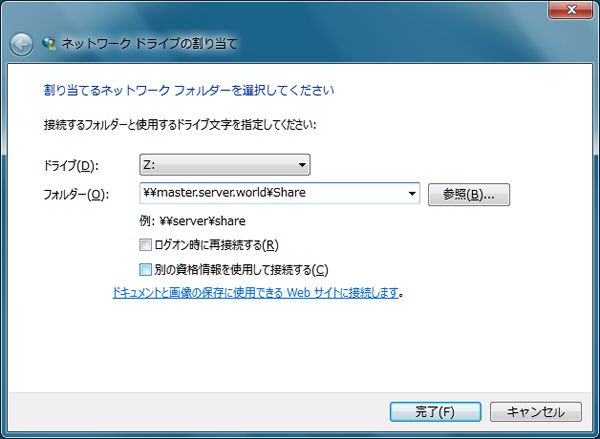
[4] Input shared folder's place in Folder section and Click 'Finish' button to enter. 


[5] Done to access. 


From (server-world)